LinkedIn profile picture tips: a clear, current photo that looks like you
Your profile picture sits beside your name in search results, posts, comments and messages. This guide covers what makes a professional LinkedIn photo, what LinkedIn accepts and recommends, and fictional examples of the crops and backgrounds that work. Nothing on this page looks at or rates your photo: it is a guide to taking your own.
Size and file
LinkedIn profile picture size and file rules
- Size LinkedIn accepts
- Between 400 x 400 and 7680 x 4320 pixels
- File
- JPG or PNG. LinkedIn does not support GIFs.
- Maximum
- 8MB
- What you can change
- Crop, position and size, rotation, filters and a frame, from the photo itself.
- Who can see it
- You choose: 1st-degree connections only, your network, all LinkedIn members or anyone. The wording differs a little on mobile.
From LinkedIn Help on uploading, editing and visibility, read on 19 September 2026.
Upload: a square
How LinkedIn shows it: a circle
What size should I upload?
LinkedIn accepts anything from 400 x 400 to 7680 x 4320 pixels. Our advice, not LinkedIn’s: upload a square, sharp photo well above the minimum, so the crop has room and your face stays clear on a large screen.
Why is it a circle when I uploaded a square?
LinkedIn shows profile pictures as a circle, so the corners of your square are never seen. Keep your head and shoulders in the middle, and use the crop LinkedIn offers when you upload.
Can it be an illustration?
Yes, within LinkedIn’s rule: “You can use an illustration, caricature, or other artistic rendering of yourself, but your profile photo must reflect your likeness.”
LinkedIn’s own advice
What LinkedIn itself recommends
Everything in this section is LinkedIn’s, from its Help pages and its own tips article. Our advice starts in the next section, and every piece of it is labelled as ours.
LinkedIn’s rules
- “You can use an illustration, caricature, or other artistic rendering of yourself, but your profile photo must reflect your likeness.”
- LinkedIn removes a profile photo that is only one of these: a company logo, an emoji, a landscape, an animal, words or phrases, a flag, a childhood or baby photo, or someone else’s likeness, including stock imagery, celebrities and fictional characters.
From LinkedIn Help, photo guidelines.
LinkedIn’s ten tips
- Pick a photo that looks like you: someone meeting you tomorrow should recognise you from it.
- Use a high-resolution image, between 400 x 400 and 7680 x 4320 pixels.
- Let your face fill about 60% of the frame, cropped from the top of your shoulders to just above your head.
- Be the only person in the picture.
- Ask someone else to take it rather than taking a selfie.
- Choose the right expression: a smile looks more approachable, and a serious look suits a more serious brand.
- Avoid distracting backgrounds, so that you are the focal point.
- Wear what you would wear to work. Solid colours tend to do best on camera.
- Take the photo in soft, natural light.
- Use filters wisely. LinkedIn offers six of them.
Summarised from 10 Tips for Taking a Professional LinkedIn Profile Photo, LinkedIn Talent Blog, 1 August 2024.
Crop
Crop and composition: fill the circle
LinkedIn says
Your face should fill about 60% of the frame, cropped from the top of your shoulders to just above your head.
Our advice, not LinkedIn’s
- Centre your head, with a little space above it so the circle does not clip your hair.
- Hold the camera at eye level. From below or above, faces look distorted.
- Keep your head level and face the camera, with your shoulders turned slightly if that feels natural.
- Check it at the size people see it: small, beside your name in a list.
Works
Expression
Expression and eye contact
LinkedIn says
A smile can make you look more approachable. If your brand is more serious, a serious expression is fine.
Our advice, not LinkedIn’s
- Look into the lens, not at the screen, so you meet the eye of whoever opens your profile.
- Relax your jaw and shoulders. A natural half smile usually reads warmer than a posed grin.
- Take many and choose the one that looks like you on a good day, not the most flattering one.
Clothing
Clothing and visual context
LinkedIn says
Wear what you would wear to work, and prefer solid colours, which tend to do best on camera.
Our advice, not LinkedIn’s
- Nothing that competes with your face: no busy patterns, large logos or big accessories.
- Sunglasses and hats hide what the photo is for. Glasses you wear every day are fine.
- A detail of your work belongs only if it is true of you, such as a chef’s jacket for a chef. Never a prop that suggests a role you do not have.
Background
Background and light
LinkedIn says
Use a simple background, so that you are the focal point, and take the photo in soft, natural light.
Our advice, not LinkedIn’s
- A plain wall or a softly blurred space works best. Choose a tone that contrasts with your hair and clothes.
- Face a window rather than standing with one behind you, and avoid hard light from directly overhead.
- Your banner sits behind your photo on your profile, so keep the two from clashing. See LinkedIn banner ideas.
What to avoid
Common LinkedIn photo mistakes
- A photo cropped out of a groupAn arm, a shoulder or half a face at the edge. LinkedIn’s advice is to be the only person in the picture.
- A distant, full-length shotShown as a small circle, your face becomes a dot.
- Sunglasses or a hatThey hide the face the photo is there to show.
- An old photoLinkedIn’s first tip is a photo that looks like you now.
- A small or blurry fileStart from a sharp photo well above LinkedIn’s 400 x 400 pixel minimum.
- A logo, landscape, pet, emoji or words instead of youLinkedIn removes a profile photo that is only one of these.
- A heavy filterIf a filter changes how you look, it defeats the point of the photo.
- A busy background, or a bright window behind youClutter pulls the eye away from you, and backlight leaves your face in shadow.
- An image that no longer looks like you, however it was madeLinkedIn’s rule is that your profile photo must reflect your likeness. If someone meeting you would not recognise you from it, it does not do its job.
Six diagrams
LinkedIn profile picture examples, all fictional
Each example is a diagram, not a photo of anyone: a square upload, the circle LinkedIn shows, and a plain head-and-shoulders shape. They teach crop, background and light. Expression and clothing are covered in words above, because a diagram cannot show them honestly.
01 · Works
- What you see
- The head and shoulders fill about 60% of the circle, centred, against a plain background.
- What to change
- Nothing. This is the crop to aim for.
02 · Too far away
- What you see
- A small figure, with most of the circle given to the room.
- What to change
- Move closer, or crop in until your face fills about 60%.
03 · Too tight
- What you see
- The top of the head and the chin are cut off by the circle.
- What to change
- Step back or crop out: from the top of the shoulders to just above the head.
04 · Busy background
- What you see
- A pattern behind the figure competes for attention.
- What to change
- Stand in front of a plain wall, or blur the background.
05 · Cropped from a group
- What you see
- Part of a second person at the edge of the circle.
- What to change
- Use a photo of you alone.
06 · Backlit
- What you see
- A bright window behind a dark figure.
- What to change
- Turn around: face the window, so the light falls on your face.
Optional
Professional LinkedIn photo prompts you can try
If you would rather restyle a photo you already have, these prompts are for the AI image tool you already use. Start from a real, recent photo of yourself. Whatever the tool produces should still look like you: LinkedIn’s rule is that your profile photo must reflect your likeness.
LinkedCheck provides these prompts as free guidance. It does not generate, inspect, score or judge the photo you make with them.

Example generated result · fictional personGenerated 19 September 2026 with an AI image tool, from the prompt on this card Clean executive
A clean executive portrait. A plain, neutral studio background in soft grey. Business-casual clothing in solid colours. Soft, even studio light with gentle natural shadows. A relaxed, confident expression with a natural smile.
See the full prompt
Use the uploaded photo as the identity reference. Create a professional LinkedIn profile photo of the same person.

Style: a clean executive portrait. A plain, neutral studio background in soft grey. Business-casual clothing in solid colours. Soft, even studio light with gentle natural shadows. A relaxed, confident expression with a natural smile.

Identity (the most important part):
1. Preserve the person's facial structure, age, skin tone, hair, glasses and distinguishing features.
2. Do not change their identity or make them look like a different person.
3. Keep the likeness. Do not beautify, slim, smooth, de-age or reshape the face.

Photo requirements:
4. Keep the face clearly visible and in focus, looking naturally towards the camera.
5. Keep natural skin texture. No heavy retouching and no plastic or airbrushed skin.
6. Frame the head and shoulders with the face in the middle of the image and a little space above the head, so it sits well inside LinkedIn's circular profile crop.
7. No text, logos, watermarks or distracting props.
8. A realistic photograph, not an illustration or a cartoon.

Example generated result · fictional personGenerated 19 September 2026 with an AI image tool, from the prompt on this card Warm professional
A warm, approachable portrait. A simple, softly blurred office or a plain neutral wall. Everyday work clothing in solid colours. Natural window light from one side, soft and flattering. A friendly, open expression with a genuine smile.
See the full prompt
Use the uploaded photo as the identity reference. Create a professional LinkedIn profile photo of the same person.

Style: a warm, approachable portrait. A simple, softly blurred office or a plain neutral wall. Everyday work clothing in solid colours. Natural window light from one side, soft and flattering. A friendly, open expression with a genuine smile.

Identity (the most important part):
1. Preserve the person's facial structure, age, skin tone, hair, glasses and distinguishing features.
2. Do not change their identity or make them look like a different person.
3. Keep the likeness. Do not beautify, slim, smooth, de-age or reshape the face.

Photo requirements:
4. Keep the face clearly visible and in focus, looking naturally towards the camera.
5. Keep natural skin texture. No heavy retouching and no plastic or airbrushed skin.
6. Frame the head and shoulders with the face in the middle of the image and a little space above the head, so it sits well inside LinkedIn's circular profile crop.
7. No text, logos, watermarks or distracting props.
8. A realistic photograph, not an illustration or a cartoon.

Example generated result · fictional personGenerated 19 September 2026 with an AI image tool, from the prompt on this card Founder and technology leader
A modern editorial portrait. A minimal background with one quiet architectural or textured element, softly out of focus. Modern, understated clothing such as a plain knit, a simple jacket or a dark shirt. Directional light with some depth and contrast. A confident, natural expression, not posed. A slightly more distinctive composition, with the face still in the middle of the frame.
See the full prompt
Use the uploaded photo as the identity reference. Create a professional LinkedIn profile photo of the same person.

Style: a modern editorial portrait. A minimal background with one quiet architectural or textured element, softly out of focus. Modern, understated clothing such as a plain knit, a simple jacket or a dark shirt. Directional light with some depth and contrast. A confident, natural expression, not posed. A slightly more distinctive composition, with the face still in the middle of the frame.

Identity (the most important part):
1. Preserve the person's facial structure, age, skin tone, hair, glasses and distinguishing features.
2. Do not change their identity or make them look like a different person.
3. Keep the likeness. Do not beautify, slim, smooth, de-age or reshape the face.

Photo requirements:
4. Keep the face clearly visible and in focus, looking naturally towards the camera.
5. Keep natural skin texture. No heavy retouching and no plastic or airbrushed skin.
6. Frame the head and shoulders with the face in the middle of the image and a little space above the head, so it sits well inside LinkedIn's circular profile crop.
7. No text, logos, watermarks or distracting props.
8. A realistic photograph, not an illustration or a cartoon.
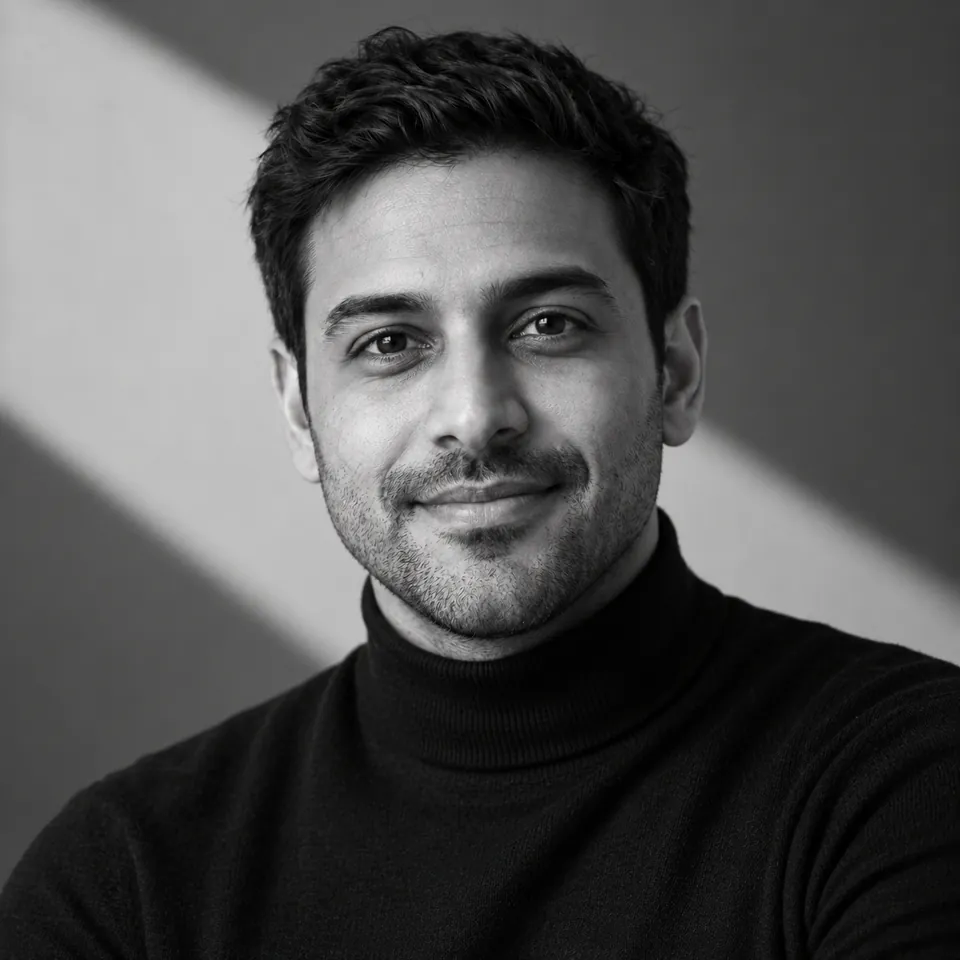
Example generated result · fictional personGenerated 19 September 2026 with an AI image tool, from the prompt on this card Black-and-white editorial
A high-resolution black-and-white editorial portrait. A simple black turtleneck or similarly minimal dark clothing. A minimal studio setting, with the body turned slightly off-centre and the face still in the middle of the frame. Dramatic but refined studio lighting: geometric shadows across the background and subtle directional light across the face. A calm, confident and thoughtful expression. A clean, editorial composition.
See the full prompt
Use the uploaded photo as the identity reference. Create a professional LinkedIn profile photo of the same person.

Style: a high-resolution black-and-white editorial portrait. A simple black turtleneck or similarly minimal dark clothing. A minimal studio setting, with the body turned slightly off-centre and the face still in the middle of the frame. Dramatic but refined studio lighting: geometric shadows across the background and subtle directional light across the face. A calm, confident and thoughtful expression. A clean, editorial composition.

Identity (the most important part):
1. Preserve the person's facial structure, age, skin tone, hair, glasses and distinguishing features.
2. Do not change their identity or make them look like a different person.
3. Keep the likeness. Do not beautify, slim, smooth, de-age or reshape the face.

Photo requirements:
4. Keep the face clearly visible and in focus, looking naturally towards the camera.
5. Keep natural skin texture. No heavy retouching and no plastic or airbrushed skin.
6. Frame the head and shoulders with the face in the middle of the image and a little space above the head, so it sits well inside LinkedIn's circular profile crop.
7. No text, logos, watermarks or distracting props.
8. A realistic photograph, not an illustration or a cartoon.

Example generated result · fictional personGenerated 19 September 2026 with an AI image tool, from the prompt on this card Consultant and client-facing
A polished, credible portrait that is not overly corporate. A plain light background or a softly blurred professional space. Smart clothing in solid colours, a jacket optional. Warm, soft light. An approachable, trustworthy expression with a slight smile.
See the full prompt
Use the uploaded photo as the identity reference. Create a professional LinkedIn profile photo of the same person.

Style: a polished, credible portrait that is not overly corporate. A plain light background or a softly blurred professional space. Smart clothing in solid colours, a jacket optional. Warm, soft light. An approachable, trustworthy expression with a slight smile.

Identity (the most important part):
1. Preserve the person's facial structure, age, skin tone, hair, glasses and distinguishing features.
2. Do not change their identity or make them look like a different person.
3. Keep the likeness. Do not beautify, slim, smooth, de-age or reshape the face.

Photo requirements:
4. Keep the face clearly visible and in focus, looking naturally towards the camera.
5. Keep natural skin texture. No heavy retouching and no plastic or airbrushed skin.
6. Frame the head and shoulders with the face in the middle of the image and a little space above the head, so it sits well inside LinkedIn's circular profile crop.
7. No text, logos, watermarks or distracting props.
8. A realistic photograph, not an illustration or a cartoon.

Example generated result · fictional personGenerated 19 September 2026 with an AI image tool, from the prompt on this card Creative professional
A more expressive portrait that is still right for a professional profile. A background in one bold, flat colour or a soft colour gradient. Clothing with personality but no busy pattern or visible logo. Soft light with gentle colour. A relaxed, natural expression.
See the full prompt
Use the uploaded photo as the identity reference. Create a professional LinkedIn profile photo of the same person.

Style: a more expressive portrait that is still right for a professional profile. A background in one bold, flat colour or a soft colour gradient. Clothing with personality but no busy pattern or visible logo. Soft light with gentle colour. A relaxed, natural expression.

Identity (the most important part):
1. Preserve the person's facial structure, age, skin tone, hair, glasses and distinguishing features.
2. Do not change their identity or make them look like a different person.
3. Keep the likeness. Do not beautify, slim, smooth, de-age or reshape the face.

Photo requirements:
4. Keep the face clearly visible and in focus, looking naturally towards the camera.
5. Keep natural skin texture. No heavy retouching and no plastic or airbrushed skin.
6. Frame the head and shoulders with the face in the middle of the image and a little space above the head, so it sits well inside LinkedIn's circular profile crop.
7. No text, logos, watermarks or distracting props.
8. A realistic photograph, not an illustration or a cartoon.
Before you use the result, check it the simple way: if someone who knows you would not recognise you straight away, use your real photo instead. Image tools can smooth skin, reshape features or add details nobody asked for, so compare the result with the photo you started from.
Five steps
How to take your LinkedIn photo in five steps
Our method, using LinkedIn’s tips where they apply.
- 01
Find the light and the wall
Stand facing a window, in front of a plain wall. Daylight from beside the camera is the easiest good light there is.
- 02
Ask someone else to take it
LinkedIn suggests someone else takes it rather than a selfie. Ask them to hold the camera at your eye level.
- 03
Take many
Change your expression a little between shots. Many photos and one good one is the usual ratio.
- 04
Choose the one that looks like you
Pick the one someone meeting you would recognise, not the most flattering.
- 05
Upload, crop and check it small
Upload it (JPG or PNG, 400 x 400 pixels or more, 8MB at most), crop it to the circle, and look at it at the size it appears beside your name.
Do you need a professional headshot?
No. A professional headshot helps if you have one, but a well-lit photo taken on a phone by someone else can follow every tip on this page.
After the photo
After the photo, check what your profile says
Your photo is part of the first impression. The next part is in words: the headline beside it, and the opening of your About. The Free LinkedIn Profile Audit reads the words on your public profile for the goal you choose and tells you how they come across, where they work against that goal, and what to lead with.
What LinkedCheck does and does not do with your photo
LinkedCheck reads words. Your photo is an image, so everything on this page is yours to do.
- Does notAssess, judge, score, edit, improve or make a profile picture. The Free LinkedIn Profile Audit says nothing about your photo.
- ReadsThe words on your public profile: how they come across for your goal, and what to lead with.
- No photo checkNeither LinkedCheck score checks your photo.
Your photo shows who you are. Your headline says what you do.
The free preview tells you what your profile’s words currently say. It says nothing about your photo.
Free first check · No card · Nothing is posted or changed on your profile
- We find your public profile, and you confirm it is the right one.
- You create a free account and choose a goal.
- You get your Free LinkedIn Profile Audit, one per account, as a PDF: where your profile stands for that goal, what is working, what is holding it back, and what to change first. LinkedCheck does not assess your photo.